Scam With Your Friends · Early Access overview, with Update 0.1.73 notes where specified.
What are you trying to do?
The daily quota gives each Scam With Your Friends workday its goal. The official description connects AI conversations, in-game scenarios, and run-based progression: as the days advance, your available scenarios and workplace disruptions change.
The publisher also confirms an end-of-day boss review. The official overview does not provide a universal quota value or a guaranteed strategy for clearing every day, so this guide does not invent one.
The main systems to recognize
Real-time AI conversations
Fictional callers respond dynamically to what happens in the game. The developer identifies AI dialogue as part of the core experience.
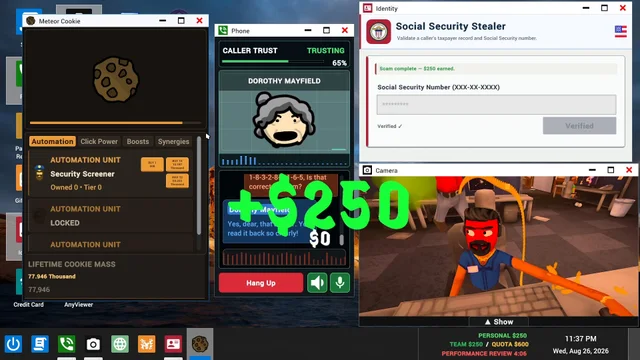
An in-game desktop
The store lists remote computer access, a paint app, a screen recorder, and a camera. These are features inside the simulation.
Workplace disruptions
The official feature list includes computer viruses, police raids, and other fictional workplace disasters.
Before your first workday
Compare your PC with the published minimum
Steam lists Windows 10 / 11, a 64-bit processor and operating system, and specific minimum hardware. Use the requirements page for the complete list.
Have broadband internet available
The developer requires a broadband connection for the current Early Access game. That requirement is not limited to the co-op feature list.
Know that typed dialogue is available
Update 0.1.73 says the game warns when speech recognition is unavailable and reminds players they can type to callers instead.
Useful notes for the current version
These Scam With Your Friends tips come from the official 0.1.73 announcement, rather than a hands-on playtest by this site.
Use the current in-game scenario instructions
Several scenario completion rules changed in 0.1.73. Older videos can show a different sequence; the same update also removed Password Recovery from the scenario selection.
Check automatic microphone leveling before adjusting it
The 0.1.73 notes say automatic microphone leveling is enabled by default. General settings lets you turn it off and adjust the phone microphone level manually.
Read a version mismatch as a version issue
The update adds clearer instructions when a lobby uses a different version. For a shared session, follow that in-game notice and compare versions with your friends.
Our interpretation: use current instructions before following a launch-day walkthrough. We have not verified a universal winning script or a complete controls reference.
Sources & version notes
Last checkedChecked on 18 October 2026. Official facts, staff guidance, and community observations are identified where used. Images and videos carry separate credits. Discord message links may require signing in and joining the official server. Early Access details can change.
Multiplayer & co-op
Confirmed lobby details, joining options, and what to check before a shared shift.